Internal tooling · JavaScript Chromium extension
Chromium extension that reduced ticket errors by 80% at HSBC México
A JavaScript extension to search the DOM, save itempaths and verify the development and quality-control steps of each ticket, used by a team of 20+ developers.
- Role
- Web Production Manager
- Year
- 2025
- Technologies
- JavaScript · HTML · CSS · Manifest V3 · Chromium extensions API · Git · GitHub
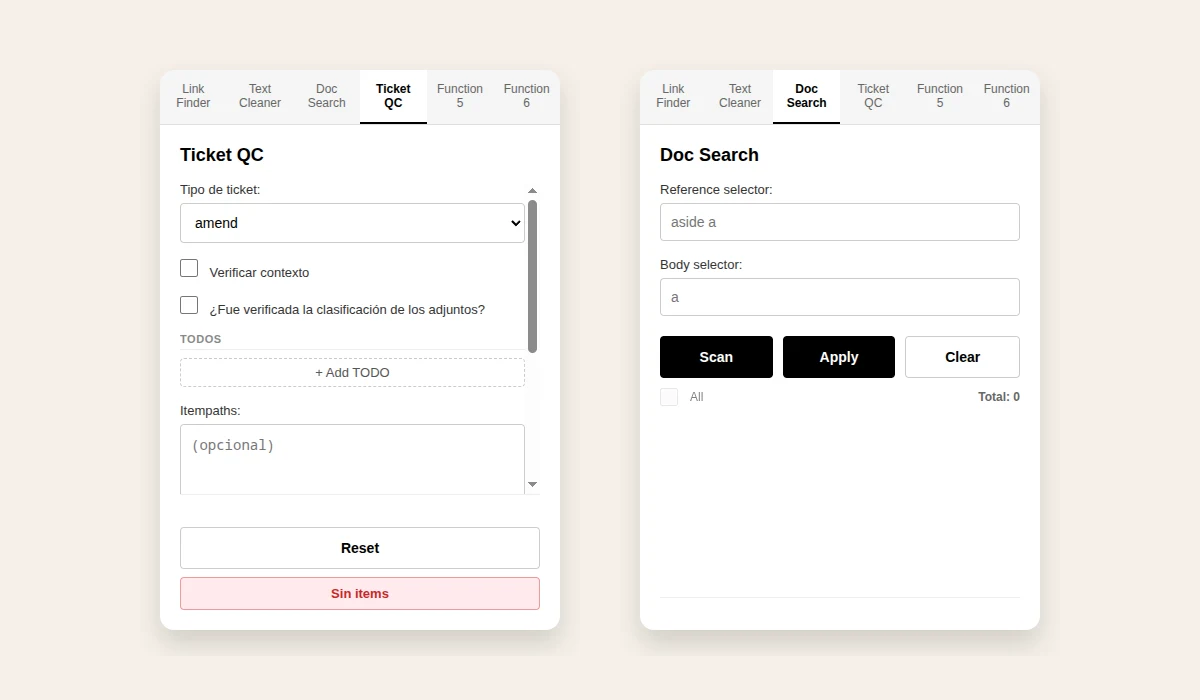
The extension popup: the Ticket QC and Doc Search tabs, rendered from the public repository.
At HSBC México I developed a Chromium extension in JavaScript, versioned and distributed with Git, for the web development team’s tickets. It searches the DOM, saves itempaths and verifies the development and quality-control steps of each ticket. Its use reduced errors by 80% across a team of more than 20 developers, according to monthly audits. It is an internal tool that exposes no sensitive content, and its code is public on GitHub.
Problem
Each ticket followed steps that had to be applied the same way: checking context, classifying attachments, adding itempaths, comments and QA links, and extra steps for tickets that remove pages. Across a team of 20+ developers, a missed step meant errors, and finding the right elements in each page’s DOM took manual work.
Solution
I built a Manifest V3 extension with vanilla JavaScript, HTML and CSS and no external dependencies. A popup with tabs groups the tools, a content script runs in the page and communicates with the popup through messages, and the settings persist in the browser. I versioned it in Git and distributed it to the team.
How it works
I built a Manifest V3 extension with vanilla JavaScript, HTML and CSS and no external dependencies. A popup with tabs groups the tools, a content script runs in the page and communicates with the popup through messages, and the settings persist in the browser. I versioned it in Git and distributed it to the team.
DOM search
Find the elements in the page
Itempaths
Save the item paths
Checklist
Verify development and QC steps
Ticket
Comments and QA links added
Work delivered
DOM search, itempaths and a ticket quality-control checklist.
DOM search and highlighting
Link Finder highlights links in the page by URL or visible text, with partial or exact match and a custom color and size.
Document search
Doc Search scans the page with a reference selector and a body selector, lists the items found and applies highlights to each one with its own color and size.
Ticket quality-control checklist
A checklist by ticket type (amend, demise and new page) covers context, attachment classification, TODOs and the steps each type requires, such as redirects, crawl and entrypoints for demise tickets.
Itempaths and comments
The extension keeps the itempaths, copies the TODO comments and confirms that itempaths, comments and QA links were added to the ticket.
Text cleaner
A text cleaner converts text into a slug-style format and copies it.
Versioning and distribution
I versioned the extension in Git and distributed it to the team; the repository is public on GitHub.
Results
Fewer errors across the development team.
80% fewer errors
Errors dropped by 80% across a team of more than 20 developers, according to monthly audits.
The same steps on every ticket
The checklist made the development and quality-control steps of each ticket type explicit and repeatable.
Internal tool, public code
The extension exposes no sensitive content, and its source code is available on GitHub.
Applied skills
- Chromium extension development
- JavaScript
- DOM manipulation
- Manifest V3
- Quality control
- Internal tooling
- Git and GitHub